
RC Setup App & Race Log
So Dialed RacetechAuto & Vehicles
4.761.00 Reviews
- Version
- 1.6.1
- Installs
- 10.00K
- Age Rating
- Everyone
Screenshots
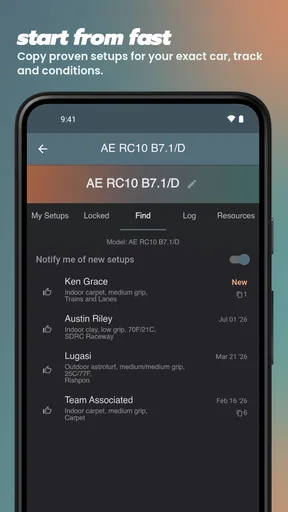
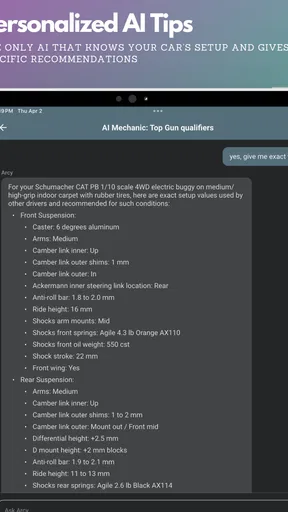
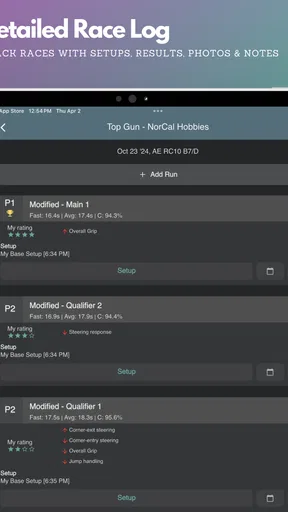
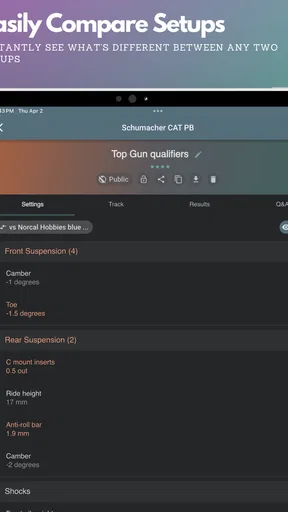
Our Review of RC Setup App & Race Log
 Analysis by Appyee
For an RC racer, speed is not only about how quickly a car gets around a track. It is also about finding the right setup without wasting a practice session on changes you cannot remember. I see the RC Setup App & Race Log as a place to organize that thinking: record what you tried, connect it to how the car felt, and make your next adjustment with a reason rather than a guess. That matters most when several small changes can blur together over a busy day.
A practical pace for trackside decisions
I would not approach this as a magic tuning tool that instantly makes a car faster. Its value is more deliberate: setup guidance and a race log can help turn observations into a repeatable process. Before a run, I can check what I have recorded for that car; after it, I can note the conditions and what seemed to improve or hurt handling. That small loop is often more useful than trying to remember a dozen details from memory.
The app is free to download, though it includes optional in-app purchases priced from $4.99 to $49.99 per item. I would treat that as a reason to explore the basic experience first and decide whether the extra value suits my own routine, rather than assuming every racer needs to spend. Its average rating is 4.7 from around 290 ratings, a positive signal from users, but I would still judge it by whether its workflow fits the way I tune and keep notes.
When a race day gets busy
The best use case I can picture is a club practice day with more than one car or several runs on a changing track. Suppose the surface gets dusty, then grip improves as more cars circulate. I can keep a separate record for each vehicle, note the conditions alongside a run, and compare those notes before making the next change. The useful insight is not simply “this setup worked”; it is remembering what the track was like when it worked.
For a cleaner comparison, I would change one meaningful setting at a time and write down both the adjustment and the result. If I alter several things between runs, a log can preserve the details but cannot tell me which change caused the difference. That is a real trade-off: the app helps with discipline, while useful conclusions still depend on how carefully I test. A quick note about steering feel or traction can be more actionable later than a vague verdict such as “better.”
Reliability comes from the habit
A log becomes valuable gradually. After one session, it is a record; after repeated visits, it can help me avoid returning to a setup that already proved awkward under similar conditions. I would use consistent labels for tracks and conditions, and keep notes short enough to enter between runs. This makes the record easier to scan when I am at the bench, with limited time before the next heat.
There is also a useful distinction between information from my own car and a setup shared by another racer. A shared setting can give me a sensible starting point, but it is not a guarantee: tires, driving style, surface, and the rest of the car all influence what feels right. I would treat other people’s setups as questions to test, not instructions to copy unchanged. That approach makes community input more useful and keeps the final decision grounded in my own results.
Who will get the most from it
This app makes the most sense for people who already want to understand why a car behaves differently from one run to the next. Beginners can benefit from having guidance in one place, while experienced racers may value a structured record of their own experiments. The developer is So Dialed Racetech, and the app sits in the auto-and-vehicles category. It is rated for Everyone, has more than 10,000 installs, and its current version is 1.6.1.
I would be less likely to recommend it to someone who only drives casually and has no interest in tuning or keeping records. A paper notebook can be faster for a racer who prefers handwriting and does not want to consult a phone at the track. General RC forums and group chats are better for open-ended discussion, but their advice can be hard to retrieve later; a dedicated log is more useful when the goal is to connect a particular change with a particular run. The app requires Android 7.0 or later, so an older device may rule it out before the setup workflow even matters.
It was released on May 14, 2020, and that history makes it sensible to check that it still suits your device and routine before depending on it for a full event. I would keep any crucial setup notes in a second place until I was comfortable with my own process. That is not a claim that the app is unreliable; it is ordinary preparation for anyone whose race-day decisions depend on information they have collected over time.
For resource demands and stability, I would keep expectations modest rather than assume a particular speed or battery impact. A setup reference and notes workflow is most useful when it feels convenient enough to use repeatedly, but real performance can vary with the phone and the environment. If the screen is awkward to read outdoors or it takes too long to enter a note between heats, short, consistent entries are a practical workaround. I would also review notes when I have time at home, rather than trying to make every comparison while the next run is lining up.
Overall, the app’s strongest case is not a promise of instant lap-time gains; it is giving a methodical racer a way to make setup experiments easier to remember and compare. I would try it if I regularly tune, run multiple cars, or want to learn from changing track conditions. If I only want casual driving, a notebook or informal advice may be enough. Used with thoughtful testing and realistic expectations, it can make trackside decisions more organized without pretending to replace experience.
Getting Started with RC Setup App & Race Log
The first thing that struck me about this app is its user-friendly interface. You know how some apps throw you into the deep end right off the bat? Not this one. As soon as you open the app, you're welcomed with an intuitive dashboard that neatly organizes everything you need. It's like having a pit crew right on your phone.
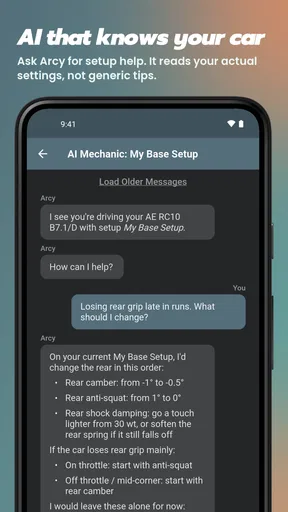
Setting up your profile is straightforward. You can log multiple cars, which is perfect if you're like me and have a small army of RC vehicles collecting dust in the garage. The app allows you to input specific details about each car, such as model, motor type, and more. This personalized touch means you’re not just getting generic advice but tailored insights for each car.
Features That Rev Up Your Experience
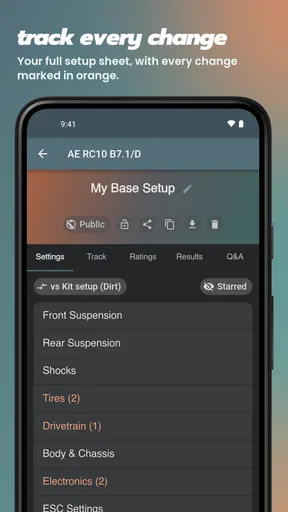
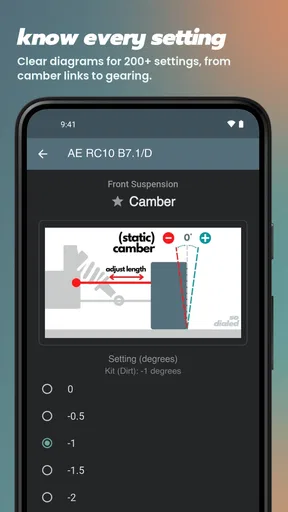
Now, let’s talk features. The RC Setup App & Race Log offers a comprehensive setup guide that covers every aspect of tuning your RC car. From suspension settings to tire choices, the app guides you through optimizing your setup for different track conditions. It’s like having an expert whispering setup secrets in your ear.
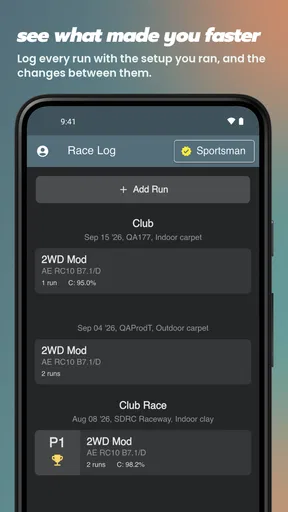
One feature I found particularly helpful is the race log. It's like a diary for your races, where you can jot down notes about each run, track conditions, and what worked or didn’t. Over time, this becomes a valuable resource for spotting trends and improving your performance. It's amazing how much you can learn from a few scribbles after each race.
Why This App Stands Out
What really sets this app apart is its community aspect. You can connect with fellow RC enthusiasts, share setups, and exchange tips. It’s like a global pit stop where everyone’s eager to help each other out. The shared setups feature is particularly handy; it’s always interesting to see what tweaks others are making to their cars.
Another standout feature is the app’s versatility. Whether you’re a newbie just getting into the hobby or a seasoned racer, the app scales to your level. Beginners will appreciate the step-by-step setup guides, while veterans will enjoy digging into the advanced tuning options and community setups.
Wrapping It Up
After spending some quality time with the RC Setup App & Race Log, I can confidently say it’s a must-have for any RC enthusiast. It takes the guesswork out of tuning and provides a platform for continuous improvement and community interaction. The combination of detailed logs, setup guides, and a thriving community makes it an invaluable tool in any RC racer's toolkit.
So, if you're ready to take your RC racing to the next level, give this app a try. Trust me, once you start using it, you'll wonder how you ever raced without it.
Verdict
Strengths of RC Setup App & Race Log
- User-friendly interface for easy navigation.
- Comprehensive setup options for customization.
- Real-time race data logging feature.
- Supports multiple vehicle profiles.
- Regular updates with new features.
Limitations of RC Setup App & Race Log
- Requires a stable internet connection.
- Limited support for older devices.
- In-app purchases can be costly.
- Notifications can be overwhelming.
- User manual could be more detailed.
Similar Picks in This Category
View All
Android Auto
Google LLC4.1

maxim — order a taxi & food
PT. SITO4.7

Штрафы ГИБДД: проверка с фото
Pays LLC – Штрафы ГИБДД4.7

Номерограм – проверка авто
Авто Ассист4.8

Дром Авто
Дром4.9

Frequently Asked Questions
What features does the RC Setup App & Race Log offer?
The RC Setup App & Race Log provides a comprehensive toolset for RC enthusiasts, including customizable setup sheets, race logging, performance tracking, and maintenance scheduling. It allows users to document and analyze race data, adjust vehicle settings for optimal performance, and keep track of maintenance tasks to ensure the best racing experience.
Is the RC Setup App & Race Log suitable for beginners?
Yes, the app is designed to be user-friendly for both beginners and experienced RC racers. It includes clear instructions and tutorials to help new users understand the setup process. The intuitive interface makes it easy to enter data and access important features, making it a great tool for those just starting out in RC racing.
Can I use the RC Setup App & Race Log offline?
Yes, the RC Setup App & Race Log offers offline functionality, allowing users to access setup sheets and race logs without an internet connection. This is particularly useful for remote race tracks where connectivity may be an issue. Users can input data offline and sync it when they have internet access.
Does the RC Setup App & Race Log support multiple vehicle types?
Absolutely, the app supports a variety of RC vehicle types, including cars, trucks, and buggies. Users can create multiple profiles for different vehicles, allowing them to manage setups, logs, and performance data for each one individually. This flexibility is ideal for hobbyists with diverse RC collections.
Is there a cost associated with using the RC Setup App & Race Log?
The RC Setup App & Race Log offers both free and premium versions. The free version provides basic features, while the premium version unlocks advanced tools and additional customization options. Users can choose the version that best suits their needs and budget, with the option to upgrade at any time.
